IMPULSE SCANNER
IMPULSE SCANNER PRO

Everything in Pro

Find markets, understand a coin, define alert conditions and verify observed outcomes. Pro brings these tasks together in the Android and Windows apps.

Pro is currently available in the Android and Windows apps through an extended trial period. Paid activation has not launched yet; Pro access may be extended during early access.

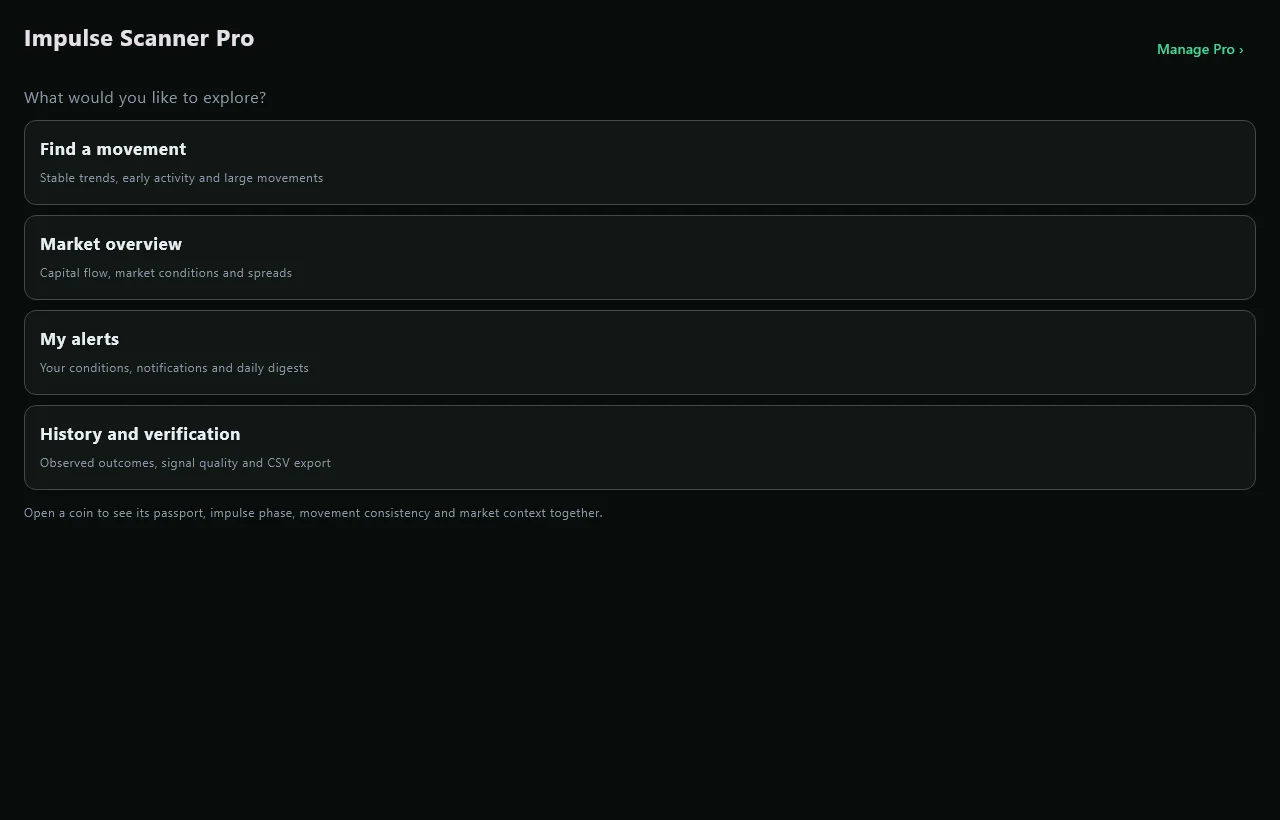
The four Pro task sections in Windows
The Pro interface starts with a task rather than a long list of tools.
01

Find a movement

Use trends and radars to shortlist markets for observation.

Pre-impulse radar

Find markets matching a researched profile seen before large moves: drawdown, position within a range and changing activity. Build a shortlist for further observation.

The profile concerns movement magnitude, not direction. Its observed usefulness depends on market conditions; read it alongside controls and sample sizes.

Large-move radar

Highlight markets by observed volatility and potential for an unusually wide move. Discover active instruments, then inspect their charts.

A potential level is not a buy or sell instruction. Historical frequencies are shown where a calibrated sample is available; missing observations are not replaced with invented probabilities.

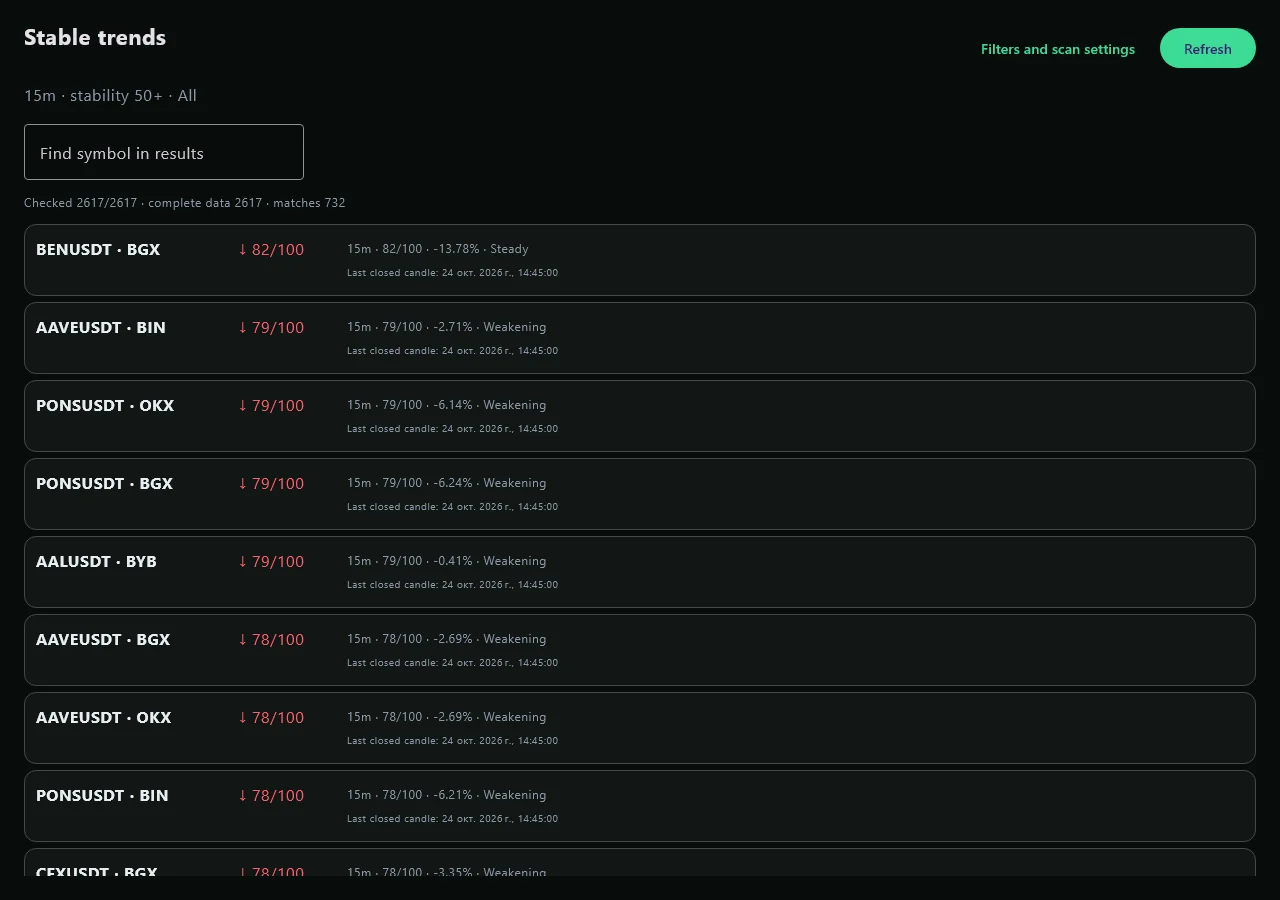
Trend stability ranking in the Windows app
Windows interface screenshot. Market values shown are not live.
02

Understand a coin

Open a market or signal card and inspect each reading individually.

Coin passport

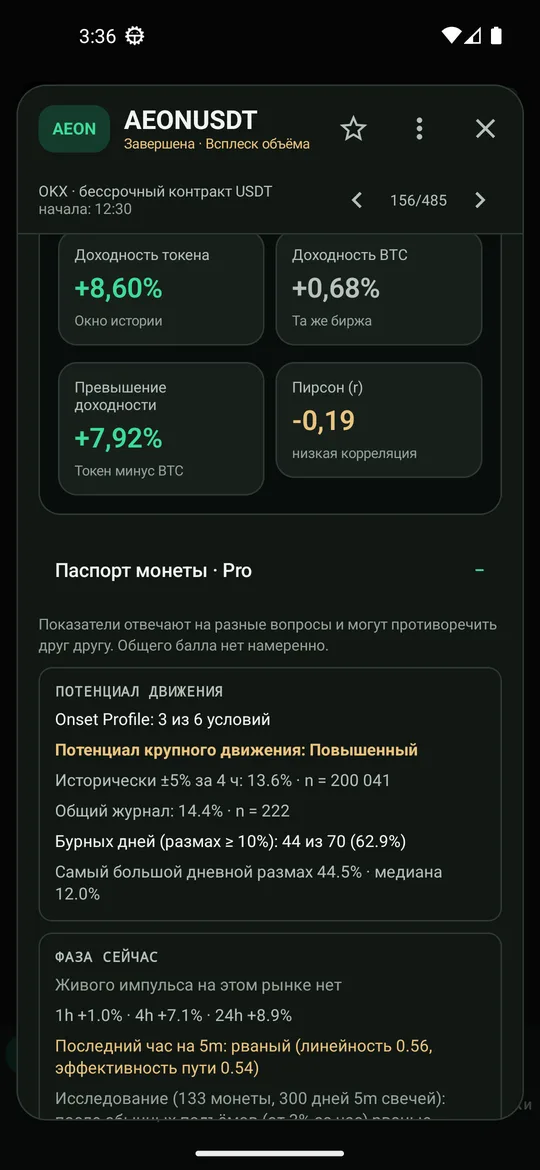
Bring three layers into a coin card: movement potential, current phase and context. Inspect history, path shape, BTC regime and available derivatives readings individually.

Readings can disagree. The passport keeps those differences visible and helps explain how a market differs from its peers, without issuing a universal trade verdict.

Historical impulsiveness

See how often and how sharply a coin made extreme moves in the available history. Compare usually quiet instruments with frequently impulsive ones.

This describes the observed past. History coverage and sample size affect the result; it does not promise a repeat.

Impulse continuation statistics

Inspect how often comparable impulses continued after detection. The observation horizon and measured sample size accompany the result.

Past outcome frequencies are not the success probability of a current trade. A fresh signal may not yet have a sufficient observation period.

Impulse state and phase

Distinguish strengthening, sustained movement and fading. Episode age and the shape of the latest segment add context to a signal.

The description can change with newly closed candles. It is not an automatic entry or exit command.

Movement smoothness

Distinguish smoother directional movement from choppy paths with frequent reversals. Put the same percentage price change in the context of how it developed.

Smoothness does not guarantee continuation. Findings about rises cannot automatically be transferred to declines; directions require separate samples.
Coin passport in Android
The passport inside an Android coin card.
03

Add market context

Compare local movement with BTC, breadth and positioning.

BTC market regime

Read the broader context: directional movement, range conditions or turbulence. Interpret a local impulse alongside BTC behaviour.

The same coin profile can behave differently across regimes. A regime describes observed conditions and can change over time.

Market mood and breadth

Summarise the observed market: fear, excitement, calm or greed, with the distribution of advancing and declining markets. Add a broader backdrop to individual signals.

Some readings require history warmup. Coverage depends on available markets and data; a state label does not measure every participant’s sentiment.

Capital Flow: positioning and activity

A Bybit research view: open-interest changes, price effects, acceleration, funding and shares of positive OI growth within the sample. Horizons are 5, 15 and 60 minutes.

Current coverage is ten selected Bybit pairs. Start optional Spot/Perp CVD for one pair to observe aggressive buying and selling. Warmup and a stream budget are visible. This does not measure money entering a token; exchange connectivity can vary by region.

04

Configure your alerts

Choose conditions and a daily overview that fits your workflow.

Custom alert rules

Create rules combining conditions, enable selected scenarios and restrict observation to watchlisted markets. Start with a template and adjust it to your task.

A rule checks data the app has received. Delivery timing depends on connectivity, background execution and device notification settings.

Daily digest

Summarise major daily moves, detected signals and available follow-up outcomes. Schedule a daily notification around your chosen hour.

The digest reflects measured data. A background check may run after the selected time, so notification timing is not guaranteed to the minute.

05

Verify outcomes and use history

Inspect measured results and export your observations.

Method self-checks

Radars record detections and subsequent outcomes. Control markets and sample sizes help assess whether a researched profile stands out in current observations.

Weak or conflicting statistics remain visible. A journal does not turn a research indicator into a validated trading strategy.

CSV export

Export signal history and available observation journals for analysis in spreadsheets. Compare episodes and check your own hypotheses outside the app.

Exports contain accumulated data. A CSV does not fill missing history or fabricate past observations.

06

Service availability

Current availability matters more than a menu entry.

Live Spreads — temporarily unavailable

The interface is designed to compare best asks/bids and available size across exchanges. It appears in the app catalogue, but the quote stream is disabled on the current server.

Do not rely on this stream during the current early-access period. A gross spread also excludes fees, funding and slippage.

Where Pro is available

Android
The Pro section, tools inside coin cards, rules, digest and CSV. The Pro Market widget brings BTC regime, mood and the radar to the home screen. Background delivery depends on Android restrictions.
Windows
Pro in the desktop workspace: trends, radars, coin context, Capital Flow, rules, summaries, self-checks and exports. Edit alert rules inside the app.
Android TV
View available Pro analytics, control trend rankings with the remote, use Capital Flow and pair the TV by QR/code from a phone. TV does not replace the full phone or PC automation editor.
Browser
The free scanner and a Pro trend demonstration on BTC, ETH and SOL. The full Pro toolset is currently available in the apps.

Free scanner, demo and Pro

CapabilityFree scannerWeb Pro demoPro apps
Price/volume impulses, charts and heatmapYesIn the free scanner alongside the demoYes
5m / 15m / 1h / 4h trends—BTC, ETH, SOL · BybitAvailable catalogue across four exchanges, filters and search
Radars, full passport, Capital Flow and lab——Yes, subject to coverage and data availability
Rules, digest and CSV exports——Android and Windows
Website accountNot requiredNot requiredStart trial access inside the app

Get started

  1. Install the Android or Windows app and open the Pro tab.
  2. Start the available trial. The app shows the current expiry; early-access extensions are possible, not automatically guaranteed.
  3. Choose a task: find a movement, explore the market, configure alerts, or inspect history and verification.
  4. Open a coin or signal card for the passport and detailed context.

Questions

Why are some readings missing?

Some readings need closed candles, accumulated history or enough outcomes. Warmup, gaps, exchange restrictions and stale observations are shown separately. A missing reading does not mean zero.

Does Pro predict profit or trade for me?

No. Scanner does not place trades or request trading API keys. Scores, profiles and historical frequencies describe the observed market. They can disagree and do not guarantee future results.

Can I buy Pro now?

Pro is currently available in the Android and Windows apps through an extended trial period. Paid activation has not launched yet; Pro access may be extended during early access.

Does the demo show all of Pro?

The demo presents one working tool: trends on three fixed Bybit markets. The other capabilities are described on this page and are available in the apps with active Pro access.